

Introduction
Moving from Local Services Ads to Performance Max can change how your campaigns are managed, measured, and optimized. A migration is more than a change in where you view the campaign. Your historical reporting, phone tracking, budget controls, bidding settings, and lead-quality monitoring all need attention.
The safest approach is to document the existing Local Services Ads setup before migration and then compare it with the migrated campaign in Google Ads.
This Local Services Ads to Performance Max migration checklist covers the most important areas to audit before and after the move.
What Changes During a Local Services Ads to Performance Max Migration?
Local Services Ads and Performance Max use different campaign environments and controls. That means advertisers should not assume that every setting, report, or tracking detail will carry over exactly as expected.
Before migration, document:
- Historical campaign performance
- Weekly budget
- Bidding targets
- Phone numbers and call-routing settings
- Services and campaign structure
- Google Business Profile information
- Lead volume and lead quality
- Existing attribution and tracking methods
This information gives you a baseline for evaluating the migrated campaign.
1. Export Your Historical LSA Performance Data
One of the first steps in a Local Services Ads to Performance Max migration should be exporting your historical performance reports.
Do this while the account is still accessible through the Local Services Ads interface. Your historical data provides an important benchmark for comparing performance after migration.
What Should You Save?
Depending on the account, save information such as:
- Lead volume
- Lead types
- Cost information
- Call activity
- Booking or message activity
- Service-level performance
- Relevant date ranges
- Lead-quality information available to your business
Don’t wait until after the migration to collect this information. Your historical reports can help identify whether changes after migration are caused by campaign performance, tracking, or lead quality.
2. Audit Your Phone Tracking Setup
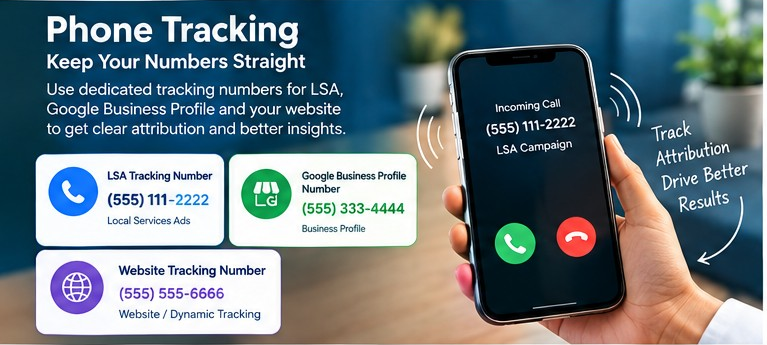
Phone tracking deserves special attention during migration.
A campaign can appear to generate calls successfully while attribution becomes harder to understand if the same phone number is used across multiple marketing sources.
Check the Preferred Campaign Number
After migration, verify that the campaign uses the phone number intended for Local Services Ads.
Check:
- Preferred campaign phone number
- Call-routing configuration
- Google Business Profile phone number
- Website tracking number
- Dynamic number replacement setup
Keep these sources distinguishable wherever possible.
Avoid Mixing LSA and Website Tracking Numbers
If your website uses dynamic number insertion for conversion tracking, don’t automatically reuse one of those numbers for the LSA campaign.
A dedicated tracking number can make source-level attribution easier to understand.
For businesses running separate campaigns for different services or verticals, also consider whether individual tracking numbers are necessary.
3. Review Google Business Profile Information
Your Google Business Profile is an important part of local advertising, so review its information before migration.
Check:
- Business name
- Address
- Phone number
- Business category
- Opening hours
- Services
- Location information
Major changes to business information may trigger verification requirements. Whenever possible, resolve known issues before the migration rather than introducing multiple changes at the same time.
Don’t Assume Everything Transferred Correctly
Even when certain fields are expected to remain separate, verify them manually.
For example, check the Business Profile phone number and the campaign’s preferred phone number after migration. A documented verification step is safer than relying only on expected platform behavior.
4. Audit the Budget Before and After Migration
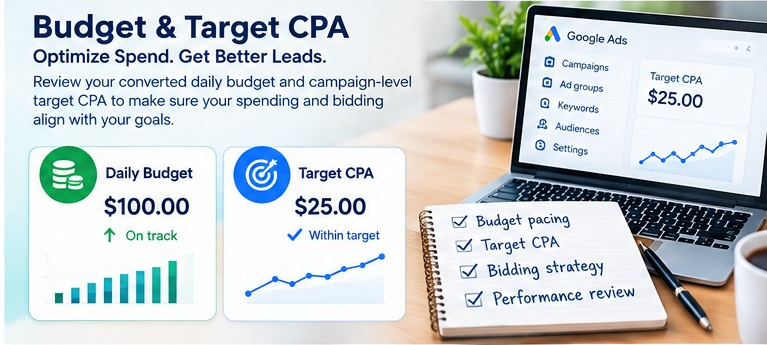
Budget management can look different after a campaign moves into Google Ads.
If a previous setup used a weekly budget and the new campaign uses a daily budget, your team should understand how the new control affects pacing and monitoring.
Review These Budget Details
Before migration, document:
- Existing weekly budget
- Expected monthly spend
- Service-level budget priorities
- Seasonal changes
- Previous spending patterns
After migration, check the converted daily budget against the original plan.
Don’t evaluate the campaign based on one day’s spend. Look at pacing over an appropriate period and compare it with the planned budget.
5. Check the Campaign-Level Target CPA
Budget is only one part of the migration audit. You should also verify the campaign-level target CPA.
A target CPA can influence how automated bidding approaches lead generation, so the setting should be reviewed alongside actual business results.
Ask:
- Is the target CPA consistent with the client’s goals?
- Has the target changed during migration?
- Are lead costs moving significantly?
- Are leads actually valuable to the business?
- Is the campaign generating qualified opportunities?
A lower cost per lead isn’t necessarily an improvement if lead quality has declined.
6. Measure Lead Quality, Not Just Lead Volume
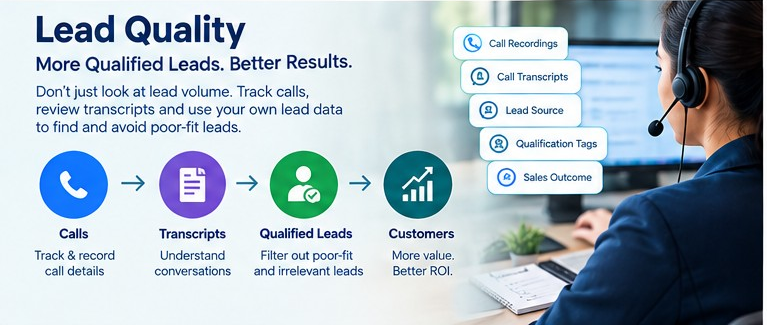
This is one of the most important parts of a Local Services Ads to Performance Max migration audit.
A campaign may generate more leads while producing fewer qualified customers. Looking only at lead volume can hide this problem.
Keep Independent Lead Records
Where possible, maintain your own records outside the advertising platform.
Useful information can include:
- Call recordings
- Call transcripts
- Lead source
- Customer qualification
- Appointment status
- Sales outcome
- Poor-fit lead reasons
- Spam or irrelevant inquiries
This information provides a second source of truth when reviewing campaign performance.
Document Poor-Quality Leads
If a lead appears irrelevant, fraudulent, or otherwise unsuitable, document the reason and retain supporting evidence.
This information may help when reviewing disputed leads or requesting account support. However, documentation should not be treated as a guarantee that a lead cost will be refunded.
7. Create a Migration Owner for Every Client
For agencies managing multiple accounts, migration can quickly become an operational challenge.
Assign one person to each client account and record the important dates and responsibilities.
Your Migration Tracker Can Include
| Item | What to Record |
|---|---|
| Client | Account/business name |
| Migration date | Scheduled or completed date |
| Owner | Person responsible |
| Historical reports | Exported/not exported |
| Tracking | Verified/not verified |
| Budget | Reviewed/not reviewed |
| Target CPA | Reviewed/not reviewed |
| Business Profile | Audited/not audited |
| Post-migration review | Completed/pending |
This simple process reduces the chance that important checks get missed.
8. Clarify Agency Responsibilities
Migration can also create a scope problem.
An agency may manage Google Ads for a client without managing the client’s Local Services Ads. Moving campaign management into Google Ads does not automatically answer who is responsible for the new workflow.
Before migration, clarify:
- Who owns the migration?
- Who receives platform notifications?
- Who checks the new campaign?
- Who monitors leads?
- Who handles tracking issues?
- Is LSA management included in the existing retainer?
- Who communicates changes to the client?
Clear ownership prevents technical changes from becoming client-service problems.
9. Compare Performance After Migration
Don’t stop the audit once the campaign appears in Google Ads.
Create a post-migration review period and compare the new campaign against the historical baseline you saved earlier.
Look at:
- Spend
- Lead volume
- Cost per lead
- Qualified leads
- Call activity
- Conversion quality
- Service-level performance
- Tracking accuracy
The goal isn’t simply to determine whether the number of leads went up or down. The goal is to understand what changed and why.
Your Local Services Ads Migration Audit Checklist
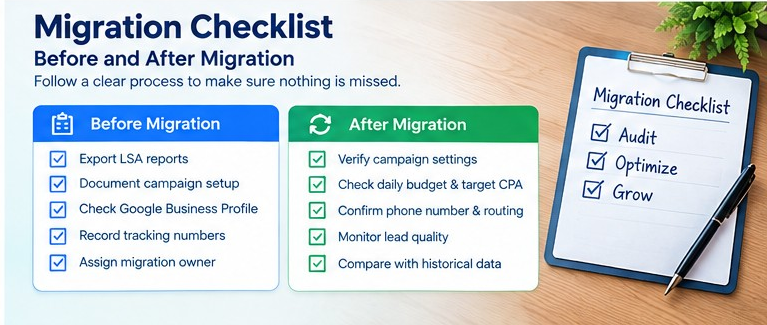
Before Migration
- Export historical LSA performance reports.
- Record the existing weekly budget.
- Document bidding and target CPA information.
- Record campaign and service structure.
- Document phone numbers and tracking methods.
- Review Google Business Profile information.
- Identify the migration owner.
- Record the expected migration date.
- Confirm who will receive migration notifications.
After Migration
- Verify the migrated campaign settings.
- Check the daily budget.
- Confirm the campaign-level target CPA.
- Verify the preferred campaign phone number.
- Check call routing.
- Keep LSA and other tracking sources distinguishable.
- Compare performance against historical reports.
- Monitor lead quality as well as lead volume.
- Document poor-fit or irrelevant leads.
- Review the campaign with the client.
Common Mistakes to Avoid During Migration
1. Waiting Until After Migration to Export Reports
Once the old interface is no longer your primary source of campaign history, you may have less context for evaluating changes.
Better approach: Export and save your historical reports first.
2. Reusing the Same Tracking Number Everywhere
Using one number across multiple sources can make attribution difficult.
Better approach: Clearly document which number belongs to each tracking source.
3. Looking Only at Lead Volume
More leads don’t automatically mean better advertising performance.
Better approach: Connect lead data with qualification and sales outcomes.
4. Ignoring Budget Pacing
A new daily budget setting can change how your team monitors spend.
Better approach: Compare actual pacing with the original budget plan.
5. Having No Clear Migration Owner
Without ownership, important checks can fall between teams.
Better approach: Assign one person to each client and track every migration step.
FAQs
What should I audit before a Local Services Ads to Performance Max migration?
Start with historical reports, phone tracking, Google Business Profile information, budget, target CPA, campaign structure, and lead-quality data. These create a baseline for checking the migrated campaign.
Does historical Local Services Ads data transfer to Google Ads?
Historical LSA reporting should be exported before migration rather than assumed to be available in the same form after the move. Save the reports you need while the account is still in the LSA interface.
Should I use the same phone number for LSA and my website?
It is generally useful to keep tracking sources distinguishable. Reusing numbers across LSA, Google Business Profile, and dynamic website tracking can make call attribution harder to interpret.
Why should I monitor lead quality after migration?
Automated campaign optimization can focus heavily on conversion signals. Lead volume alone doesn’t tell you whether those conversions are producing qualified prospects or customers.
Who should manage a client’s migration?
Assign a specific migration owner for each account. That person can coordinate notifications, export reports, verify settings, communicate with the client, and complete the post-migration review.
Internal Linking Opportunities
Add relevant internal links to existing pages on your website, such as:
- Google Ads Management Services → link to your PPC/Google Ads service page.
- Local SEO Services → link when discussing Google Business Profile optimization.
- Google Business Profile Guide → link from the Business Profile section.
- Lead Tracking & Conversion Tracking → link from the phone-tracking section.
- Performance Max Campaign Management → link from the post-migration section.
- Digital Marketing Services → link from the conclusion or agency-management section.
Use descriptive anchor text rather than generic phrases such as “click here.”
External Authority-Link Opportunities
Consider linking to authoritative Google resources covering:
- Google Ads Performance Max documentation — useful for explaining Performance Max campaign controls.
- Google Business Profile Help — useful for Business Profile information, verification, and management.
Use the most relevant current Google documentation pages when publishing so the links remain accurate.
Suggested Image SEO
Featured image filename:local-services-ads-to-performance-max-migration-audit.jpg
Featured image ALT text:Local Services Ads to Performance Max migration audit checklist
Additional image ALT text ideas
Google Ads campaign budget and target CPA auditLocal Services Ads phone tracking number checklistPerformance Max migration checklist for local businesses
Avoid stuffing keywords into image ALT text. Describe what the image actually shows.
FAQ Schema Suggestion
Add FAQ structured data only if the same questions and answers are visibly available on the published page and the implementation follows Google’s current structured-data guidelines.
Suggested FAQ questions:
- What should I audit before a Local Services Ads to Performance Max migration?
- Does historical Local Services Ads data transfer to Google Ads?
- Should I use the same phone number for LSA and my website?
- Why should I monitor lead quality after migration?
- Who should manage a client’s migration?
Article Schema Suggestion
Use Article structured data with fields such as:
headlinedescriptionimageauthordatePublisheddateModifiedpublishermainEntityOfPage
Make sure the structured-data information matches the visible content on the page.
Conclusion
A Local Services Ads to Performance Max migration should be treated as an audit and measurement project, not simply a campaign move.
Export historical data before migration, document the existing tracking setup, verify the preferred campaign phone number, and review Google Business Profile information. After the move, pay close attention to daily budget pacing and target CPA while measuring lead quality alongside lead volume.
For agencies, assigning a clear migration owner and using a repeatable checklist can make the process much easier to manage.
The most important principle is simple: preserve your baseline before migration, verify the new setup afterward, and judge performance using qualified leads—not just the number of leads generated.