
Google Ads has become increasingly sophisticated at distinguishing between new customers, existing customers, and high-value users.
That sounds useful—and it can be.
But Customer Lifecycle Goals can also create confusion when campaign settings, audience lists, bidding strategies, and conversion values aren’t configured correctly.
A campaign labeled “New Customer Acquisition” isn’t necessarily targeting only new customers. And a Performance Max campaign using an audience signal isn’t automatically a retargeting campaign.
Even more importantly, some Customer Lifecycle settings can change the value Google Ads assigns to conversions. If you don’t understand those adjustments, the ROAS shown inside Google Ads may not tell the whole story.
So, should you use Customer Lifecycle Goals?
Let’s break down the good, the bad, and the ugly.
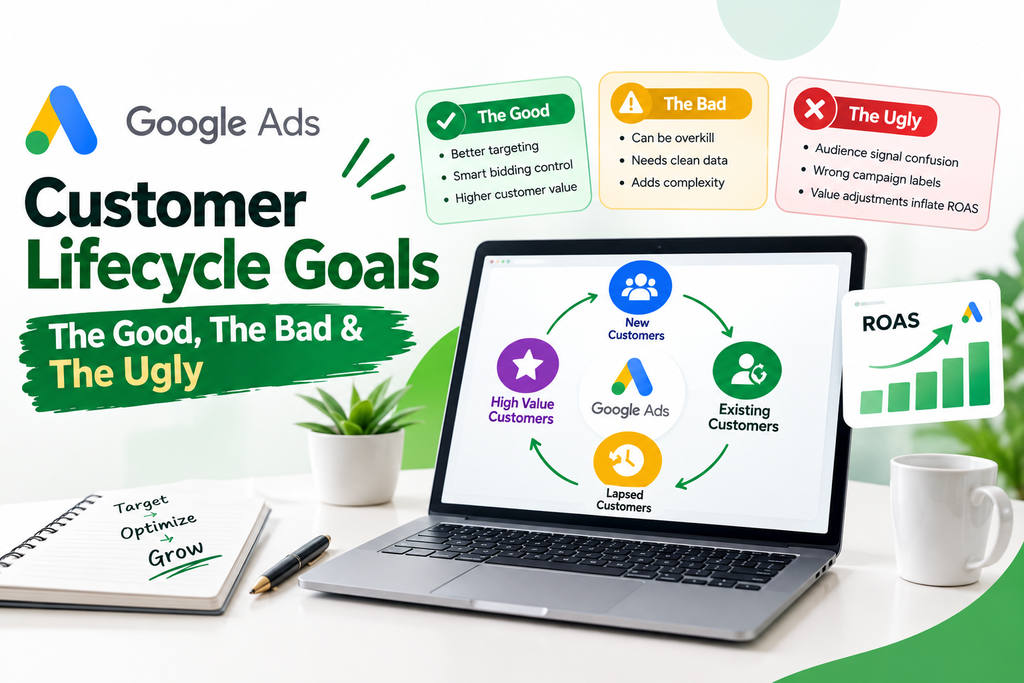
What Are Customer Lifecycle Goals in Google Ads?
Customer Lifecycle Goals are Google Ads features designed to help advertisers adjust their targeting and bidding based on where users sit within the customer journey.
Instead of treating every conversion the same, advertisers can give Google Ads additional information about whether someone is:
- A new customer
- An existing customer
- A lapsed customer
- A high-value customer
- A loyalty-program member
These signals can then influence campaign targeting, bidding, or conversion-value calculations, depending on the campaign type and configuration.
The basic idea is simple:
Tell Google Ads who matters to your business, and allow your campaigns to optimize differently for different customer groups.
The implementation, however, is where things get complicated.
The Good: Where Customer Lifecycle Goals Can Help
When implemented correctly, Customer Lifecycle Goals can give advertisers more control over customer acquisition and retention strategies.
1. Separate New Customers From Existing Customers
For an ecommerce business, acquiring a completely new customer may have a different business value than generating another order from an existing customer.
For example:
- New customer → potentially higher long-term value
- Existing customer → potentially lower acquisition cost
- Lapsed customer → opportunity for reactivation
- High-value customer → potentially worth additional bidding attention
Customer Lifecycle Goals can help Google Ads account for these differences.
2. Customer Acquisition Can Support Growth
If your primary business objective is acquiring new customers, Google Ads provides customer acquisition options that can help campaigns focus more heavily on users who aren’t already customers.
Depending on the setup, advertisers may be able to:
- Prioritize new customers
- Bid differently for new customers
- Exclude existing customers
- Focus on users who are genuinely new prospects
This can be useful when your marketing budget is specifically intended for customer growth rather than repeat purchases.
3. Customer Retention Can Support Repeat Business
Customer Lifecycle Goals aren’t only about finding new customers.
They can also support retention strategies.
For example, a business might want to reach:
- Existing customers
- Customers who haven’t purchased recently
- Loyalty-program members
- Higher-value existing customers
This can be useful for businesses where repeat purchases are an important part of revenue.
However, there’s an important distinction:
Customer retention goals aren’t automatically the same thing as traditional retargeting.
Customer Acquisition vs. Customer Retention
These two concepts are easy to confuse.
Customer Acquisition
The objective is to find and convert people who are not already customers.
Typical strategies include:
- New customer targeting
- Customer-list exclusions
- New-customer bidding adjustments
- Prospect-focused campaigns
Customer Retention
The objective is to reconnect with people who already have a customer relationship with the business.
Examples include:
- Reactivating previous buyers
- Reaching loyalty members
- Promoting new products to existing customers
- Encouraging repeat purchases
The important question isn’t simply:
“Do I want more customers?”
Instead, ask:
“Which customer group should this campaign prioritize, and what behavior do I actually want Google Ads to optimize for?”
The Bad: Customer Lifecycle Goals May Be Overkill
Here’s where advertisers should slow down.
Not every business needs advanced customer lifecycle bidding.
If your business has:
- A relatively small customer database
- Limited conversion volume
- Short customer journeys
- Low repeat-purchase activity
- A small advertising budget
then adding multiple customer lifecycle layers may create unnecessary complexity.
More Settings Don’t Automatically Mean Better Performance
A common mistake is assuming that advanced Google Ads features will automatically improve campaign performance.
They won’t.
The quality of the underlying data matters more.
If your customer list is incomplete, outdated, poorly segmented, or incorrectly categorized, Google Ads may be optimizing against information that doesn’t accurately represent your business.
Before activating Customer Lifecycle Goals, check:
Is the customer data reliable?
Is the segmentation meaningful?
Does the campaign have enough conversion volume?
Does the business actually need different treatment for different customer groups?
If the answer to these questions is no, simpler audience exclusions or targeting may be easier to manage.
The Ugly: Common Customer Lifecycle Goals Mistakes
This is where things can get expensive.
1. Mistaking Audience Signals for Targeting
One of the biggest Performance Max misconceptions is treating an audience signal as if it were a targeting restriction.
It isn’t.
Audience signals provide Google with information about the types of users who may be valuable.
They don’t necessarily mean:
“Only show ads to these people.”
That’s an important difference.
For example, adding a previous-customer list as an audience signal doesn’t automatically turn a Performance Max campaign into a retargeting campaign.
Google can use that information as a signal while continuing to find additional users.
The takeaway
Always distinguish between:
Audience signal → guidance
and
Targeting/exclusion → restriction
Confusing the two can lead to campaigns behaving very differently from what the account structure suggests.
2. Calling a Campaign “NCA” Doesn’t Make It New-Customer Focused
Campaign naming conventions don’t control campaign behavior.
You could name a campaign:
PMax – New Customers
But if the actual settings don’t exclude or prioritize customers as intended, the name is meaningless.
Always audit the configuration instead of trusting campaign labels.
Check:
- Customer acquisition settings
- Customer lists
- Audience exclusions
- Conversion goals
- Bid strategy
- Value adjustments
- Campaign eligibility
The campaign name is documentation—not a targeting rule.
3. Incorrect Customer Lists
Customer Lifecycle Goals depend heavily on customer data.
If the wrong audience is uploaded or categorized, the campaign may receive incorrect signals.
For example, a list intended to represent existing customers shouldn’t accidentally contain:
- General website visitors
- Newsletter subscribers who never purchased
- Leads who never became customers
- Unqualified prospects
- Employees or internal users
Define what “customer” actually means before configuring the campaign.
For one business, a customer might mean someone who completed a purchase.
For another, it might mean someone who became a paying subscriber.
That definition should match the business’s actual conversion model.
4. Value Adjustments Can Make ROAS Look Better Than It Really Is
This is one of the most important areas to understand.
Some Customer Lifecycle configurations can influence bidding by assigning additional value to certain customer types.
For example, Google Ads may effectively treat a conversion from a particular customer segment as more valuable for optimization purposes.
That can influence the value reported inside the advertising platform.
The problem arises when marketers look only at the platform’s reported ROAS and assume it represents actual business profitability.
It may not.
Example
Suppose your actual sales revenue is:
₹5,00,000
and advertising spend is:
₹1,50,000
Your straightforward revenue-to-ad-spend ratio is:
₹5,00,000 ÷ ₹1,50,000 = 3.33 ROAS
Now imagine Google Ads applies additional conversion value for certain customer categories.
The platform may report a higher conversion value for optimization and reporting purposes.
That doesn’t necessarily mean your business received that additional revenue.
What should you check?
When auditing an account, look beyond the headline ROAS.
Review:
- Conversion value
- Value adjustments
- Actual transaction revenue
- Customer type
- New vs. returning customers
- Advertising spend
- Profit margins
Reported platform value and real business revenue are not always identical.
5. Assuming Customer Retention Means Traditional Retargeting
This is another common misunderstanding.
Traditional retargeting generally means showing ads to people based on previous interactions, such as:
- Website visits
- Product views
- Previous engagement
- Customer lists
Customer retention settings can involve existing customers, but they may also introduce bidding behavior designed around customer lifecycle characteristics.
That’s why advertisers shouldn’t automatically use a retention goal simply because they want to run a remarketing campaign.
First determine whether you need:
Audience targeting
or
Customer lifecycle optimization
or both.
When Should You Consider Customer Lifecycle Goals?
There isn’t one universal customer-count threshold that works for every business.
Instead, consider the scale and complexity of your customer base.
Customer Lifecycle Goals may become more relevant when your business has:
- A substantial customer database
- Significant repeat purchases
- Reliable first-party customer data
- Meaningful differences between new and existing customer value
- Enough conversion volume for automated bidding
- Large-scale advertising activity
- A clear customer retention strategy
They’re potentially less useful when you’re running a small campaign with limited customer data and relatively few conversions.
A Simple Customer Lifecycle Goals Audit
Before activating or troubleshooting these settings, run through this checklist.
Customer Data
- Is the customer list accurate?
- Is it updated regularly?
- Does it contain actual customers?
- Are different customer groups clearly defined?
Campaign Configuration
- Is customer acquisition enabled?
- Is customer retention enabled?
- Are existing customers excluded where appropriate?
- Are audience signals being confused with targeting?
Conversion Tracking
- Are primary conversions configured correctly?
- Is transaction revenue accurate?
- Are duplicate conversions being recorded?
- Are conversion values realistic?
Bidding
- Is the campaign using an appropriate Smart Bidding strategy?
- Is the campaign generating enough conversion data?
- Are value adjustments being applied?
Reporting
- Are you comparing Google Ads revenue with actual business revenue?
- Have you checked new vs. returning customer performance?
- Are you monitoring profitability rather than ROAS alone?
Customer Lifecycle Goals and Performance Max
Performance Max deserves special attention because its automation works differently from traditional campaign structures.
Advertisers sometimes build a PMax campaign and assume they can control it like a conventional retargeting campaign.
That assumption can cause problems.
Performance Max can use:
- Customer lists
- Audience signals
- Search themes
- Creative assets
- Conversion data
- Customer acquisition settings
But these components don’t all function as hard targeting restrictions.
A useful way to think about it
Your data tells Google what you know.
Audience signals tell Google where to look.
Conversion goals tell Google what success means.
Bidding tells Google how aggressively to pursue that success.
Understanding those differences makes account audits much easier.
How to Avoid Inflated ROAS
If you’re using Customer Lifecycle Goals, don’t stop at the ROAS number shown in the dashboard.
Build a broader reporting framework.
Track:
| Metric | Why It Matters |
|---|---|
| Ad Spend | Measures investment |
| Actual Revenue | Measures business income |
| Reported Conversion Value | Shows Google Ads’ recorded value |
| Value Adjustments | Identifies additional assigned value |
| New Customer Revenue | Measures acquisition |
| Returning Customer Revenue | Measures retention |
| CAC | Measures acquisition efficiency |
| Profit Margin | Measures actual business impact |
This gives you a much clearer picture than relying on one platform metric.
A Better Approach for Most Advertisers
Advanced features aren’t inherently better than simple campaign structures.
Start with the fundamentals:
- Define what a customer means.
- Maintain accurate first-party data.
- Set up conversion tracking correctly.
- Separate acquisition and retention objectives.
- Use audience exclusions when appropriate.
- Understand how Performance Max uses audience signals.
- Check conversion-value adjustments.
- Compare platform reporting with real business revenue.
- Introduce advanced lifecycle settings only when they solve a genuine business problem.
The goal isn’t to use every Google Ads feature.
The goal is to give automation accurate information and clear objectives.
Frequently Asked Questions
What are Customer Lifecycle Goals in Google Ads?
Customer Lifecycle Goals are Google Ads features that allow advertisers to account for different customer groups, such as new, existing, lapsed, or loyalty customers, through targeting and bidding-related settings.
Are Customer Lifecycle Goals the same as retargeting?
No. Customer lifecycle settings and traditional retargeting can overlap, but they aren’t identical. Lifecycle goals can include bidding or value adjustments, while traditional audience targeting can simply focus ads on a defined audience.
Do Customer Lifecycle Goals work with Performance Max?
Performance Max supports customer lifecycle features, but the exact available options and compatibility can change. Always check Google’s current documentation before implementing a new setup.
Can Customer Lifecycle Goals increase reported ROAS?
Certain lifecycle configurations can affect conversion values used for optimization and reporting. Advertisers should therefore review value adjustments and compare Google Ads reporting against actual business revenue.
Does every business need Customer Lifecycle Goals?
No. Their usefulness depends on factors such as customer-data quality, customer-base size, repeat-purchase behavior, conversion volume, and campaign complexity. For some businesses, straightforward audience targeting or exclusions may be sufficient.
Final Takeaway
Customer Lifecycle Goals can be powerful, but they aren’t a shortcut to better Google Ads performance.
The biggest risk isn’t simply choosing the wrong setting. It’s misunderstanding what the setting actually does.
Before using these features, make sure you understand:
- Who your customers are
- How your customer lists are built
- Whether you’re acquiring or retaining customers
- How Performance Max uses audience signals
- Whether value adjustments are affecting reported conversion value
- Whether your reported ROAS reflects actual business economics
For many advertisers, a well-structured account with accurate conversion tracking, sensible audience exclusions, and appropriate Smart Bidding can accomplish the objective without adding unnecessary complexity.
Use Customer Lifecycle Goals when they solve a specific customer-segmentation or bidding problem—not simply because the feature exists.