
Introduction
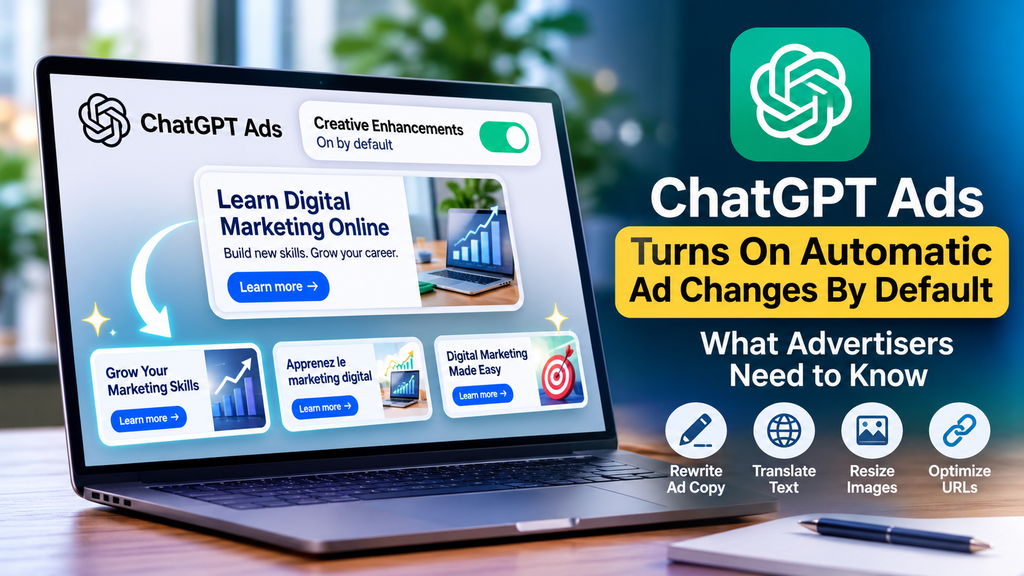
ChatGPT Ads: Automatic Changes Now Default is an important update for advertisers using OpenAI’s advertising platform. Starting October 30, 2026, creative enhancements are enabled by default for new and existing ChatGPT Ads campaigns, allowing the system to adapt ad copy, translate text, resize images, and optimize destination URLs.
This feature allows the advertising system to adjust headlines, descriptions, image sizes, languages, and destination URLs to make ads more relevant to a conversation. Advertisers do not need to review and approve every variation before it runs.
Although automated adjustments may help businesses deliver more relevant messages, they also raise important questions about creative control, website traffic, and campaign tracking. Understanding these changes can help advertisers make informed decisions about their advertising strategy.
What Is the ChatGPT Ads Automatic Changes Update?
The ChatGPT Ads: Automatic Changes Now Default update introduces creative enhancements as a default setting for advertising campaigns, allowing the system to adjust ad copy, images, and destination URLs to better match users’ conversations.
Creative enhancements use an advertiser’s existing ad and landing-page content to generate or adjust variations that may better fit the context in which an advertisement appears.
For example, a business promoting digital marketing training might use a general headline such as “Learn Digital Marketing Online.” The system could adapt the wording to emphasize practical online marketing skills when the surrounding conversation makes that message more relevant.
The purpose is to make advertising more contextually relevant without requiring advertisers to manually create every possible variation.
According to OpenAI’s official creative enhancements documentation, these changes can be prepared in advance or generated in real time.
What Can ChatGPT Ads Creative Enhancements Change?
The ChatGPT Ads: Automatic Changes Now Default update allows creative enhancements to affect several parts of an advertisement. Advertisers should understand each change before deciding whether to keep the setting enabled.b
1. Headlines and Descriptions
The ChatGPT Ads: Automatic Changes Now Default update allows the system to rewrite existing headlines and descriptions or create new versions based on the advertisement’s content and the context of the conversation.
For example:
- Original headline: Digital Marketing Training for Beginners
- Possible adapted headline: Build Practical Digital Marketing Skills Online
The revised headline communicates a similar offer while emphasizing a benefit that may be more relevant to the person viewing the ad.
Advertisers should still make sure that their original messaging accurately describes their products, services, and offers.
2. Automatic Language Translation
The ChatGPT Ads: Automatic Changes Now Default update allows the system to translate advertising text into another language to make the message more relevant to a user’s language preferences.
This could help businesses reach audiences who prefer different languages without requiring a separate manually written version for every situation.
However, translation must preserve the original meaning. Advertisers should be especially careful with technical terms, product conditions, promotional claims, and pricing information.
3. Image Resizing
The system may resize advertising images to fit the required ad format.
This can help adapt creative assets to different display requirements. Nevertheless, advertisers should prepare clear images with readable text, visible branding, and important product details positioned appropriately.
With the ChatGPT Ads: Automatic Changes Now Default update, even when image dimensions change, the main advertising message should remain clear, readable, and understandable to users.
4. Destination URL Optimization
One of the most important changes is the ability to adjust the destination URL.
With the ChatGPT Ads: Automatic Changes Now Default update, instead of sending every person to the same landing page, the system may direct users to a more relevant page on the advertiser’s website based on their interests and conversation context.
For example, a business advertising several digital marketing services might have separate pages for SEO, paid advertising, and social media marketing. Depending on the available website content and conversational context, a more relevant page may be selected.
This creates an important consideration: advertisers need to know which pages are eligible to receive paid traffic and verify how their tracking parameters behave when destination URLs change.
Why Are Creative Enhancements Enabled by Default?
The main goal of creative enhancements is to make advertisements more relevant to the conversations in which they appear.
Traditional advertising often relies on keywords, audience characteristics, and predefined creative assets. Conversational advertising introduces another consideration: what a person is discussing and what they may need at that moment.
For advertisers, this approach may offer several potential benefits:
- More relevant messaging: Headlines and descriptions can better reflect the user’s context.
- Less manual work: Advertisers may not need to create every variation themselves.
- Language flexibility: Ad text can be adapted for different language preferences.
- Relevant landing pages: People may be directed to pages that better match their interests.
- New optimization opportunities: Businesses can evaluate overall campaign results while testing this automated approach.
The ChatGPT Ads: Automatic Changes Now Default update offers potential advantages, but these are not guaranteed improvements. Advertisers should assess actual campaign performance rather than assume that automated changes will always produce better results.
How to Turn Off ChatGPT Ads Creative Enhancements
With the ChatGPT Ads: Automatic Changes Now Default update, advertisers who prefer tighter control over their ad copy and destination URLs can opt out of creative enhancements through Ads Manager.
OpenAI’s documentation describes account-level and campaign-level settings. Existing opt-outs are preserved, and campaign-specific settings take priority over the account default.
Follow these steps:
- Open ChatGPT Ads Manager.
- Navigate to Manage settings.
- Review the creative enhancements setting.
- Turn off creative enhancements at the account level or for the relevant campaign, using the controls available in your account.
- Save or confirm the change if prompted.
- Revisit the settings to verify that your preferred option is active.
The precise interface may vary as the advertising platform develops.
Important: Turning off creative enhancements does not mean that every aspect of ad delivery becomes manual. It specifically disables the creative enhancement feature covered by that setting.
Advertisers should consult the official OpenAI creative enhancements guide for the latest instructions.
How the Update Affects Landing Pages and UTM Tracking
Automatic destination URL optimization makes tracking an important part of the discussion.
UTM parameters help marketers identify where website traffic originates and which campaigns generate visits. These parameters can support analysis in tools such as Google Analytics.
For example, a campaign URL might contain:
?utm_source=chatgpt&utm_medium=paid&utm_campaign=dm_training
These parameters can help identify traffic associated with a ChatGPT advertising campaign when they are preserved and correctly recorded.
However, a change in the destination URL creates a question that advertisers should not ignore: will the expected tracking information remain available when the system selects another landing page?
The ChatGPT Ads: Automatic Changes Now Default update raises important tracking questions because the creative enhancements documentation does not fully explain every tracking-parameter scenario when destination URLs change. Therefore, advertisers should test their own setup rather than assume that every parameter will always be preserved.
What Advertisers Should Check
Before and after enabling creative enhancements, review the following:
- UTM parameters: Check whether campaign tags are present on the final landing-page URL.
- Google Analytics: Confirm that incoming visits are attributed to the expected source, medium, and campaign.
- Landing-page relevance: Make sure the destination matches the advertised product or service.
- Conversion tracking: Test whether important actions, such as form submissions or enquiries, are recorded correctly.
- Website accuracy: Confirm that pricing, offers, availability, and service information are up to date.
The ChatGPT Ads: Automatic Changes Now Default update makes these checks important because they help advertisers identify tracking or destination issues before relying on campaign reports to make major decisions.
How to Measure Campaign Performance After the Update
The ChatGPT Ads: Automatic Changes Now Default update can change the version of an advertisement that a person sees. As a result, comparing overall campaign performance requires careful interpretation to understand how these creative enhancements may affect results.
OpenAI’s documentation describes reporting at the campaign, ad group, and ad levels, with available metrics including impressions, clicks, spend, click-through rate (CTR), and attributed conversions when conversion measurement is configured.
Advertisers should review several metrics together instead of relying on a single number.
Key Metrics to Monitor
1. Impressions
Impressions show how many times an advertisement was displayed. They help advertisers understand campaign delivery.
2. Click-Through Rate (CTR)
CTR measures the percentage of impressions that resulted in clicks. A change in CTR may indicate a change in audience response, but it does not explain the cause on its own.
3. Cost per Click (CPC)
CPC helps advertisers understand how much they are paying for each click. Compare it with conversion quality to determine whether the traffic is valuable.
4. Conversion Rate
Conversion rate measures how often visitors complete a desired action, such as submitting a lead form or making a purchase.
5. Cost per Acquisition (CPA)
With the ChatGPT Ads: Automatic Changes Now Default update, CPA measures the cost of acquiring a conversion and helps businesses determine whether their advertising costs are sustainable.
Can Advertisers See Every Enhanced Ad Version?
According to OpenAI’s documentation, the ChatGPT Ads: Automatic Changes Now Default update means advertisers do not receive a preview of every ad variation before it runs, and changes in campaign performance over time alone do not establish the effect of creative enhancements.
For this reason, advertisers should avoid attributing every improvement or decline to the feature alone.
Changes in audience composition, budgets, competition, landing-page performance, and other campaign factors can also affect results.
What Should Businesses Do Now?
The ChatGPT Ads: Automatic Changes Now Default update should not be viewed as either an automatic improvement or an immediate problem. Businesses should review their settings, check their advertising information, and measure campaign results to determine whether these changes support their marketing goals.
Businesses can improve their advertising strategy by exploring professional digital marketing services that support campaign optimization, audience targeting, and performance measurement.
Here are five practical steps to follow.
Step 1: Review Your Account Settings
With the ChatGPT Ads: Automatic Changes Now Default update, check whether creative enhancements are enabled at the account and campaign levels. Decide whether automatic adjustments fit your advertising objectives and preferred level of control.
Step 2: Improve Your Original Ad Copy
Write clear headlines and descriptions that explain what you offer, who the offer is for, and what benefit customers can expect.
Automation works from the available advertising and landing-page information, so clear source material matters.
Step 3: Update Your Landing Pages
Ensure that each relevant page contains accurate information about services, pricing, promotions, availability, and next steps.
With the ChatGPT Ads: Automatic Changes Now Default update, an automatically selected landing page should still provide a relevant, useful, and seamless experience for someone arriving from an advertisement.
Step 4: Test Your Analytics Setup
Check UTM parameters, traffic attribution, and conversion events. Confirm that the reporting system records the results you need to evaluate the campaign.
Step 5: Review Results Regularly
Monitor CTR, CPC, conversions, CPA, and the quality of incoming leads. Compare performance over suitable periods and consider other factors that could explain the results.
Do not assume that an increase in clicks necessarily means an increase in profitable conversions.
The Future of AI-Powered Advertising
The ChatGPT Ads update reflects a broader direction in digital advertising: using AI to adapt advertising messages to context rather than relying entirely on fixed creative assets.
OpenAI has also described how its advertising system evaluates conversational intent and ad relevance separately from ChatGPT’s answer-generation process. This distinction is important because advertisements are intended to remain separate from the answers users receive.
For advertisers, the opportunity lies in combining automation with strong fundamentals: accurate information, relevant landing pages, clear messaging, and reliable measurement.
As the platform evolves, marketers should pay attention to new reporting features and controls while avoiding assumptions about capabilities that have not been documented.
Frequently Asked Questions (FAQs)
1. What does ChatGPT Ads Turns On Automatic Ad Changes By Default mean?
It means that creative enhancements are enabled automatically for new and existing ChatGPT Ads campaigns starting October 30, 2026, according to OpenAI’s documentation. The feature can adjust ad text, translate copy, resize images, and optimize destination URLs.
2. Can advertisers turn off ChatGPT Ads creative enhancements?
Yes. Advertisers can opt out through Ads Manager using the Manage settings controls. Account-level settings establish the default, while campaign-level settings take priority for the relevant campaign.
3. Does ChatGPT Ads automatically rewrite every advertisement?
No. Creative enhancements may create or adjust variations, but the specific changes depend on the advertisement, its landing-page content, and the context in which it appears. Advertisers should not assume that every element will change in every instance.
4. Can automatic destination URL changes affect campaign tracking?
They may create tracking questions that need to be tested. Advertisers should verify UTM parameters, final landing-page URLs, analytics attribution, and conversion tracking instead of assuming that every tracking parameter will be preserved in every situation.
5. How can advertisers measure the impact of creative enhancements?
Advertisers can monitor impressions, clicks, CTR, spend, and attributed conversions where measurement is configured. However, changes in overall performance do not independently prove that creative enhancements caused the difference.
Conclusion
ChatGPT Ads Turns On Automatic Ad Changes By Default marks an important development in conversational advertising. By enabling creative enhancements automatically, OpenAI is giving advertisers a way to adapt ad messaging, image sizes, languages, and destination URLs to different contexts.
These capabilities may help businesses deliver more relevant advertising, but they also make campaign oversight and measurement essential. Advertisers should review their settings, maintain accurate landing pages, verify tracking parameters, and monitor conversion quality before drawing conclusions about performance.
The most effective approach is to use automation thoughtfully while keeping business goals, customer experience, and reliable analytics at the centre of every campaign.