

Google Ads Introduces Channel Prioritization And Budget Allocation
Google Ads Introduces Channel Prioritization And Budget Allocation to give advertisers greater control over how their advertising budgets are distributed across supported channels. The update introduces new options for prioritizing advertising networks and limiting spending on lower-priority inventory.
These controls are designed for Search, Shopping, Performance Max, and Demand Gen campaigns. They aim to help businesses balance Google’s automated bidding technology with their own budget management preferences. Google Ads Introduces Channel Prioritization And Budget Allocation gives PPC advertisers more flexibility when managing campaign budgets. These controls can help businesses decide which supported advertising channels deserve priority while maintaining a strategy based on conversions, cost efficiency, and campaign goals.
In this article, we explain how Google Ads channel prioritization works, how budget allocation limits can help advertisers, and what PPC professionals should know about the announced changes.
What Google Ads Introduces Channel Prioritization And Budget Allocation Means for Advertisers
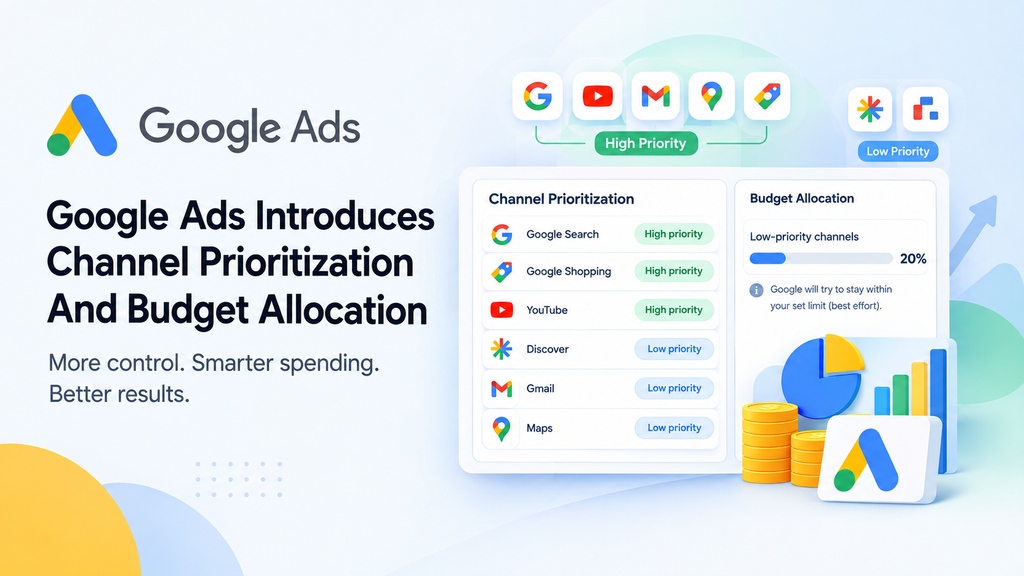
Google Ads Introduces Channel Prioritization And Budget Allocation as a way for advertisers to influence where their campaign budgets are spent. Instead of treating every supported channel equally, advertisers can assign high or low priority based on their campaign objectives.
The new controls include two main features:
- Channel Prioritization: Allows advertisers to give supported channels or channel groups high or low priority.
- Budget Allocation: Allows advertisers to set percentage-based spending limits for supported lower-priority inventory.
These features are designed to provide more flexibility without requiring advertisers to exclude every channel they do not want to prioritize.
For example, a business focused on generating leads through Google Search may want Search inventory to receive priority while testing Search Partners with a smaller allocation.
The actual results will still depend on campaign settings, available traffic, bidding strategies, and conversion performance.
How Does Google Ads Channel Prioritization Work?
Channel prioritization allows advertisers to specify which supported networks should receive preference when Google allocates campaign spending.
With Google Ads Introduces Channel Prioritization And Budget Allocation, advertisers can organize supported channels according to their campaign priorities. This approach can help marketing teams test additional inventory while keeping their main advertising objectives in focus.
High-Priority Channels
High-priority channels receive preference during budget allocation. Advertisers can use this setting to emphasize the inventory most closely aligned with their marketing goals.
For example, a company that generates qualified enquiries through Search may choose to prioritize Google Search over other supported inventory.
High priority does not guarantee a fixed amount of spending, clicks, or conversions. Google’s bidding systems will continue to consider campaign objectives and available opportunities.
Low-Priority Channels
Low-priority channels receive less preference than high-priority channels under the new controls.
This can help advertisers test additional inventory without giving it the same priority as their main traffic source.
For instance, a business might prioritize Search while assigning lower priority to Search Partners or the Display Network, depending on the settings available for its campaign.
Google has indicated that channels will default to high priority, so advertisers should review their configurations when the feature becomes available.
How Does Google Ads Budget Allocation Help Control Spending?
Budget allocation introduces percentage-based limits for spending on supported lower-priority channels.
Consider an advertiser with a daily campaign budget of ₹5,000 who wants to test an additional network without allocating too much money to it.Google Ads Introduces Channel Prioritization And Budget Allocation also offers percentage-based controls for eligible lower-priority channels. Advertisers can use these settings to manage testing budgets more carefully, although the allocation limits are best-effort controls rather than guaranteed spending caps.
If the advertiser sets a 20% allocation limit, the corresponding amount would be ₹1,000.
This is an illustration of the percentage calculation, not a guarantee that exactly ₹1,000 will be spent. Google describes the limits as best-effort controls rather than guaranteed hard caps.
Can Advertisers Set a 0% Allocation?
According to the announced feature details, a 0% option will be available for supported channel settings.
This could help advertisers prevent spending on selected channels or channel groups where the control is supported.
The ability to limit spending may be useful for businesses that want to experiment with different networks while maintaining a clear budget strategy.
Which Campaign Types Will Support the New Controls?
The announced rollout covers several Google Ads campaign types, but the available settings will vary.
Search Campaigns
Search advertisers can manage supported network priorities, including relevant Search Partners and Display Network settings.
These controls may help businesses focus on Search while evaluating other available inventory.
Shopping Campaigns
Shopping campaigns are included in the announced rollout. Advertisers should review their account settings to understand which channel priorities and allocation options are available.
Performance Max Campaigns
Performance Max combines multiple Google advertising channels in a single campaign. Under the announced prioritization settings, Google-owned channels such as Search, YouTube, Discover, Gmail, and Maps are grouped together.
Advertisers should not expect to prioritize each of these placements individually through the grouped controls.
Demand Gen Campaigns
Demand Gen is also included in the announced update. The available options will depend on the campaign settings and feature availability.
Limited Demand Gen testing is expected to begin in November 2026, according to the announcement.
How Can Advertisers Configure Channel Prioritization?
Google has described account-level defaults and individual campaign settings for the new controls. Campaign-level settings can override account-level preferences when a different approach is needed.
Once the feature is available in an account, advertisers can follow these general steps:
- Sign in to Google Ads and select the relevant account.
- Locate the channel prioritization and budget allocation settings.
- Review the options available for the campaign type.
- Identify which supported channels align with campaign goals.
- Assign high or low priority where appropriate.
- Set allocation percentages for supported lower-priority channels if needed.
- Save the settings and monitor campaign performance.
Google has also announced API support at launch, which may help marketing teams manage these controls programmatically.
The exact interface and availability may vary during the rollout, so advertisers should confirm the options available in their own accounts.
Google Ads Channel Prioritization And Budget Allocation: February 2027 Changes
Advertisers running Search campaigns with the Display Network enabled should pay attention to the announced changes scheduled for February 2027.
Under the existing arrangement described by Google, Search inventory receives priority over Display when both networks are enabled. Google plans to retire that existing Display spending allocation setup.
Because the new controls are expected to default channels to high priority, advertisers who do not review their configurations could see changes in how spending is distributed.
Google recommends setting Display to low priority with a 50% budget allocation to maintain the existing configuration described in the announcement. A one-click migration option is also expected when the new controls launch.
What Should Advertisers Do Before February 2027?
Advertisers should:
- Review Search campaigns with Display enabled.
- Document existing network settings.
- Check the new priority and allocation options when available.
- Confirm migration settings before applying changes.
- Monitor spending, conversions, and lead quality after migration.
Businesses should verify the available options in their accounts rather than assume every campaign will be affected identically.
How Do the New Controls Work With Automated Bidding?
Google Ads uses automated bidding strategies such as Target CPA and Target ROAS to optimize campaigns toward specified performance goals.
This raises an important question: why do advertisers need channel priorities if Google’s bidding systems already optimize performance?
The new controls are intended to provide additional influence over spending while allowing automated bidding to continue working toward campaign objectives.The goal of Google Ads Introduces Channel Prioritization And Budget Allocation is to give advertisers more spending control without replacing automated bidding. Businesses should continue reviewing conversion tracking, cost per acquisition, and return on ad spend before changing channel settings.
For campaigns that are not budget-constrained and are already meeting their targets, changing channel priorities alone may have little impact. Allocation limits can provide another way to influence spending on supported networks.
However, restricting inventory without a clear reason could reduce conversion opportunities. Advertisers should evaluate campaign performance before making significant changes.
How Should Advertisers Measure Channel Performance?
Google Ads channel prioritization is most useful when advertisers can evaluate the results of their budget decisions.
Performance Max already provides channel-level reporting. Expanded channel reporting for Search is expected in the first quarter of 2027, according to the announcement.
Google also plans to introduce account-level budget allocation insights to help advertisers evaluate their settings.
Until additional reporting becomes available, advertisers can use existing network segmentation and available campaign reports.
Important metrics to monitor include:
- Cost per conversion
- Conversion rate
- Return on ad spend (ROAS)
- Cost per click (CPC)
- Qualified leads and completed sales
- Spending by available network or channel
These metrics can help businesses understand whether their advertising spend is generating meaningful results rather than simply attracting clicks.
Best Practices for Google Ads Budget Management
More control over spending does not automatically produce better campaign performance. Advertisers should make adjustments based on evidence and business objectives.
1. Review Existing Performance Data
Analyze recent campaign results before lowering a channel’s priority. A network that appears less efficient may still contribute to valuable conversions.
2. Avoid Restricting Profitable Inventory Too Early
If campaigns consistently meet their CPA or ROAS targets, reducing available inventory could limit opportunities for conversions.
3. Test Lower-Priority Channels Carefully
Define a clear testing objective, set an appropriate allocation, and evaluate results against meaningful performance metrics.
4. Match Priorities to Business Goals
Lead generation campaigns may focus on qualified enquiries, while ecommerce campaigns may prioritize profitable sales and return on ad spend.
5. Monitor Changes Regularly
Review spending and conversion data after making adjustments. Avoid changing too many settings simultaneously, as this can make results harder to interpret.
Frequently Asked Questions
1. What Is Google Ads Introduces Channel Prioritization And Budget Allocation?
It refers to Google’s announced controls that let advertisers prioritize supported advertising channels and apply percentage-based allocation limits to lower-priority inventory.
2. Can Advertisers Limit Spending on Search Partners?
The announced controls support percentage allocation limits for eligible lower-priority channels. The exact options depend on the campaign type and the settings available in the account.
3. Do These Controls Replace Automated Bidding?
No. They are designed to work alongside automated bidding strategies such as Target CPA and Target ROAS, giving advertisers additional influence over spending.
4. When Will the New Controls Become Available?
Google announced a global rollout over the coming months. Limited Demand Gen testing is expected to begin in November 2026, while the existing Search Display Network allocation setup is scheduled to change in February 2027. Availability may vary by account.
5. Should Advertisers Change Their Settings Immediately?
Not necessarily. Advertisers should review existing configurations, understand the available options, and make changes based on campaign performance and business objectives.
Conclusion
Google Ads Introduces Channel Prioritization And Budget Allocation to give advertisers more flexibility in managing spending across supported advertising channels.Overall, Google Ads Introduces Channel Prioritization And Budget Allocation gives advertisers another way to manage channel preferences and evaluate budget distribution. Reviewing campaign data before making changes will help businesses use these controls more thoughtfully as the rollout progresses.
The ability to prioritize channels and limit spending on lower-priority inventory may help businesses test new opportunities without giving every network equal preference. However, these controls do not replace reliable conversion tracking, performance analysis, or a clear campaign strategy.
As the rollout progresses, advertisers should review their settings, monitor results, and make decisions based on meaningful business outcomes. A balanced approach can help PPC teams combine the benefits of automation with greater control over advertising budgets.