
Google Lighthouse, the free tool many of us use to test website speed and SEO, just added something new. The latest version includes a Lighthouse AI agent audit that checks whether AI agents can discover the tools and services your website offers.
If that sounds futuristic, it is. But it is also a clear signal of where the web is heading. Let’s unpack what this audit does, whether your business needs to care today, and what sensible next steps look like.
First, What Is an AI Agent?
An AI agent is software that does tasks for a person, not just answers questions. Instead of only telling you “here are three salons nearby,” an agent might check availability and book the appointment for you.
For agents to do that, they need to know what a website can do. Can it take bookings? Does it have a product catalogue? Is there an API for orders? That is the problem this new standard tries to solve.
What the Lighthouse AI Agent Audit Checks
According to Search Engine Journal’s report, Lighthouse 13.5 adds an audit for something called Agentic Resource Discovery, or ARD.
ARD is a proposed standard where a website publishes a small catalog file. That file lists the tools, services, and resources AI agents can use on the site.
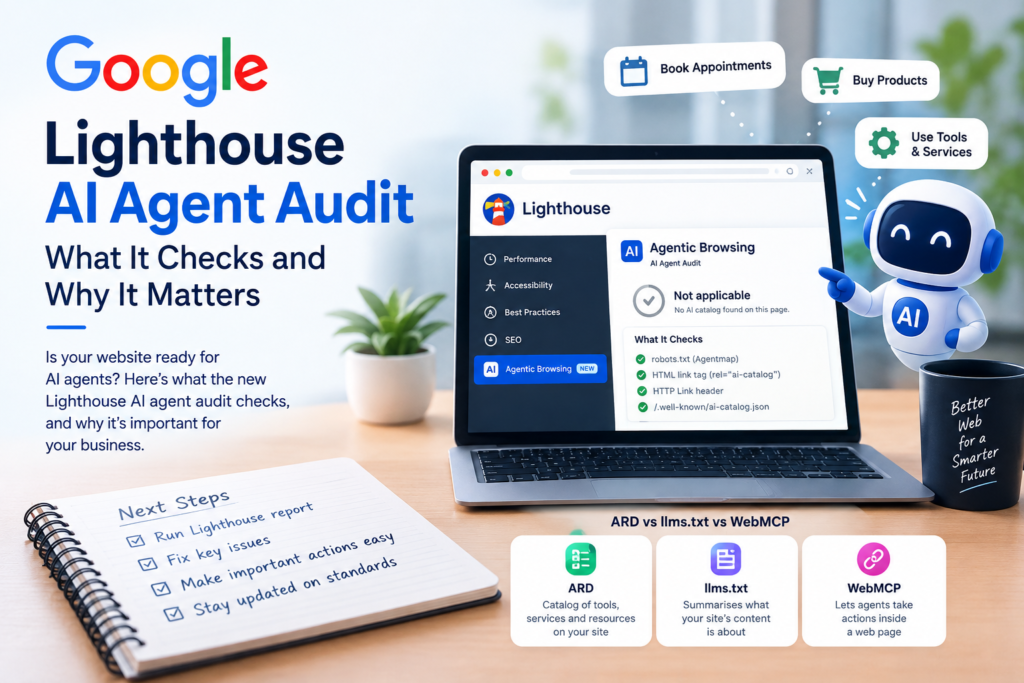
The Lighthouse AI agent audit looks for that catalog in a set order:
- An “Agentmap” line in your robots.txt file
- A link tag in your HTML with rel=”ai-catalog”
- The same relation sent in an HTTP Link header
- A default file at /.well-known/ai-catalog.json
Newer versions of the ARD specification point to /.well-known/ard.json instead, but the current Lighthouse code does not check that path yet. That tells you how early and fast-moving this all is.
How the Results Work
The Lighthouse AI agent audit does not give you a score out of 100. There are three possible outcomes:
- Pass: a valid catalog was found and it matches the schema
- Fail: a catalog pointer exists, but the file has errors or cannot load
- Not applicable: no catalog was found anywhere
It sits in a new experimental “Agentic Browsing” category, separate from your usual Performance and SEO scores. Instead of a score, that category shows a pass ratio, because the standards are still being worked out.
So if the Lighthouse AI agent audit shows “not applicable,” do not panic. That is what almost every website will see right now.
Where You Can Run the Lighthouse AI Agent Audit
The audit is rolling out in Chrome DevTools (Chrome 156) and is expected to appear in PageSpeed Insights soon after. You can open DevTools, go to the Lighthouse tab, and look for the Agentic Browsing category once it reaches your browser.
How ARD Differs From llms.txt and WebMCP
You may have heard of other AI-related standards. Here is a simple comparison:
- llms.txt: a text file that summarises what your site’s content is about
- WebMCP: lets agents take actions inside a web page
- ARD: a catalog that tells agents which tools and services exist on your site
They solve different problems. None of them has become a must-have for small businesses yet.
Should Small Businesses Act on the Lighthouse AI Agent Audit Now?
Honest answer: for most local businesses, not yet.
If you run a clinic, retail shop, coaching institute, or service business in Kolhapur, Sangli, or Pune, your time is better spent on the basics that already influence AI answers today:
- A fast, mobile-friendly website
- Clear service pages with prices and FAQs
- An accurate, active Google Business Profile
- Consistent business details across the web
- Genuine reviews
Our technical SEO checklist for AI search covers these in detail.
That said, some businesses should start paying attention:
- E-commerce stores with large catalogues
- Booking-based businesses like hotels, salons, and clinics with online appointments
- SaaS or tech companies that offer APIs or tools
For these, AI agents may soon become a real channel for orders and bookings. Knowing about the Lighthouse AI agent audit early gives you a head start.
What We Recommend Doing Today
You do not need to pass the Lighthouse AI agent audit this week. But a few low-effort moves make sense:
Run a normal Lighthouse report
Fix the Performance, Accessibility, and SEO issues it already flags. These matter now and help both people and AI.
Make your key actions easy to find
Your booking form, contact details, and product pages should be simple, clearly labelled, and not hidden behind pop-ups or heavy scripts. Agents and humans both benefit.
Keep an eye on standards
Specs like ARD are changing quickly. The file path has already changed once. Wait until things settle before investing development time, unless agents are a core channel for you.
Talk to your developer
If you run an online store or booking system, ask your developer or platform provider whether they plan to support agent-friendly standards.
The Bigger Picture
The Lighthouse AI agent audit is a small feature, but it shows Google is preparing for a web where AI agents do more of the browsing and buying. Websites that are clean, fast, and clearly structured will adapt most easily when that shift speeds up.
For now, focus on strong fundamentals and stay curious. If you would like a quick review of how ready your website is for both search and AI, reach out to the Growith Digital team.